Product, App & Brand Case 14

Attend

Attend is the conference platform we designed and built ourselves: an organiser console, a participant and staff app that works offline, an EU-hosted backend, a bilingual marketing site and the brand that holds it together. Two months after the first commit, it ran Sarajevo Energy & Climate Week 2026.

ClientAttend
IndustrySaaS · Events & Conferences
Timeline2 months
Last updated2026-10-27
AuthorKonzept team
TeamFedjaAlenAdnanAzra

We built Attend as one connected platform for everyone at a conference. Organisers run the programme, people, partners, check-in and reports from a React console. Participants get the programme, a personal schedule, questions, polls, networking and their badge in an Expo app for iOS, Android and web, and door staff scan badges with the same app, even with no connection. Underneath, self-hosted Supabase in the EU keeps each organisation's data separate, and a bilingual Astro site and a calm, honest brand sell it to the institutions that need it.

Live site · viewport
attend.ba
Attend console event overview with readiness checks and navigation
01 / 03

The Challenge

Conferences in Bosnia and Herzegovina and across the region are still run on a PDF programme, spreadsheets of guests, paper sign-in sheets at the door and partner reports assembled by hand afterwards. Every change is made in several places, and the numbers sponsors and funders ask for are reconstructed from memory.

The global platforms exist, but they are priced, supported and translated for other markets. Few work in Bosnian, procurement and EU data requirements are an afterthought, and almost none plan for the thing every local organiser knows: venue Wi-Fi gives out exactly when the hall is full.

We had worked on events long enough to know what the day needs. So we set out to build our own product: one platform that takes a conference from programme to door to partner report, in two languages, with check-in that does not need the internet. And we had a hard deadline, because Sarajevo Energy & Climate Week 2026 was going to run on it.

02 / 03

The Approach

We designed Attend around the roles people play on event day, not around a feature list. An organiser needs control, a participant needs answers, door staff need a scanner that never stalls, a moderator needs the best question on the screen and a partner needs proof. Each surface was built for one of those jobs, and all of them share one source of truth, so a change made in the console is the change everyone sees.

01

One Control Plane

A React console holds the whole event: programme, speakers, rooms, attendees, documents, partners, announcements, check-in and reports. Sections follow the job, Setup, Run and Reach, and publishing is blocked until every required language is complete, so a half-translated programme never reaches a phone.

02

Offline-First App

One Expo and React Native codebase ships the participant app to iOS, Android and web. The programme, personal schedule and badge keep working without a signal, and questions and votes queue on the device until it reconnects. Anything that truly needs the network says so.

03

A Door That Never Waits

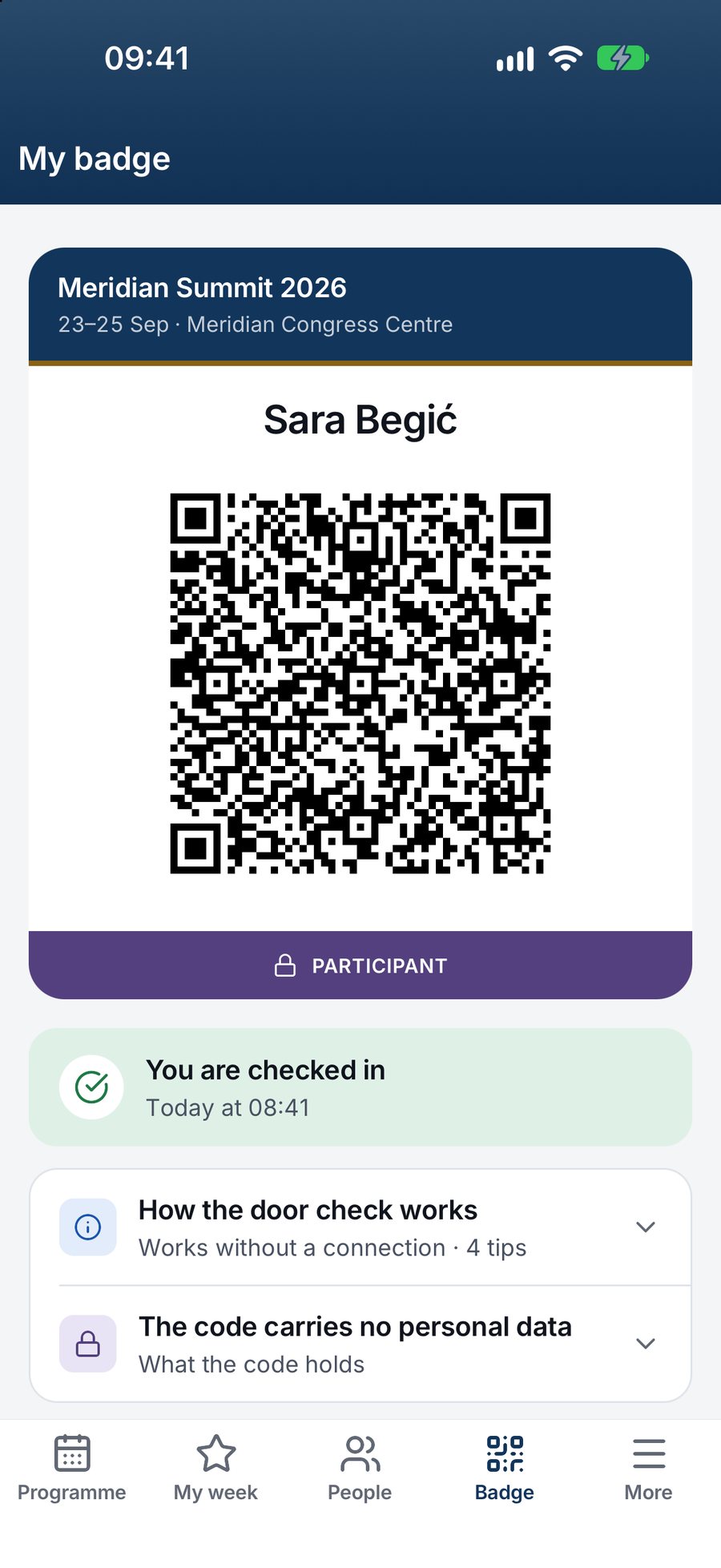
Badges are signed QR codes with no personal data inside. The staff scanner verifies each signature on the device, saves accepted scans and syncs them later, and the server keeps one record per person. Walk-ins are added, badged and checked in at the desk in one step.

04

The Room on Screen

Participants ask, upvote and vote from their phones. Moderators approve questions in the console, and Screen view puts the top-voted ones and the live poll on the projector. Notifications go to exactly the audience chosen, with the recipient count shown before sending.

05

Proof for Partners

Partners get pages, tiered logos and scheduled placements in the app, and the console turns displays, views, taps and consented lead scans into a PDF report for each partner. Attendance reports by day, entrance and organiser separate unique people from entries, and a dash is never a zero.

06

Private by Design

Self-hosted Supabase in the EU stores the data, database policies keep organisations apart, and sign-in uses e-mail links instead of passwords. Consent questions start unticked, the directory is opt-in, there is no facial recognition or location tracking, and personal data can be exported or erased on request.

01 / Console

One control plane for the whole event

A conference team usually runs its event from a stack of things that do not talk to each other: a programme in a PDF, a guest list in a spreadsheet, speaker bios in an inbox and a sponsor list on someone's desktop. On event day that means every late change is made three times, and at least one copy is always wrong.

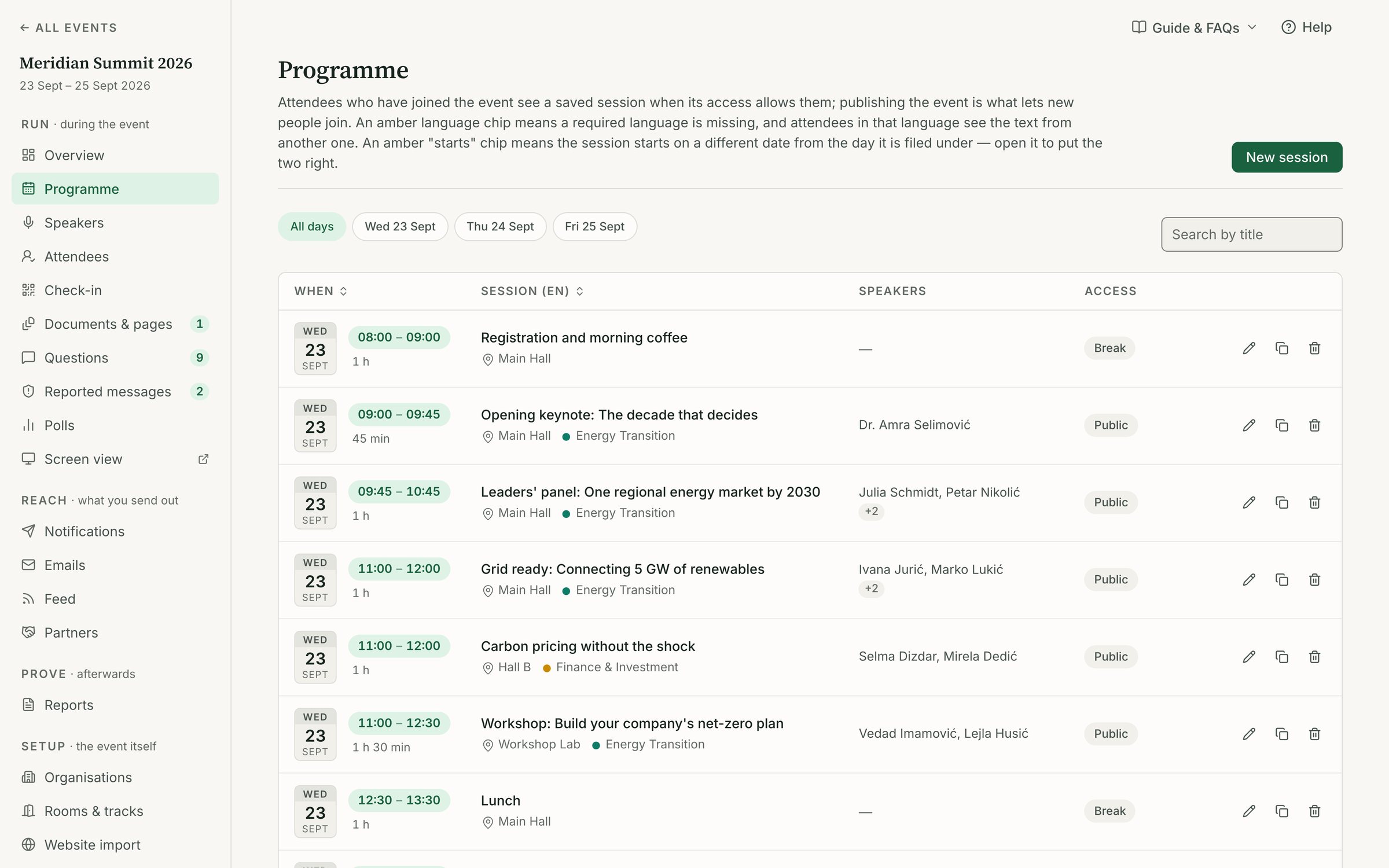
We built the Attend console as the single place where the event is defined. Programme, speakers, rooms, tracks, attendees, documents, partners, announcements, check-in and reports all live in one React app, grouped into Setup, Run and Reach so a team member always knows which part of the job they are in. Every page carries its own guide and FAQs, and the event home opens on an overview that shows what is ready and what is not.

Change it once, everywhere

When an organiser moves a session to another room or swaps a speaker, the change is made in one place and reaches every participant's phone the next time it connects. There is no second programme to update and no reprint at the registration desk.

The decision: publishing has rules

Attend runs in Bosnian and English, and half-translated programmes are a real risk at bilingual events. So each event declares which languages are required, missing translations get an amber mark, and the console will not publish until every required language is complete. A participant never opens a session that exists in only one language by accident.

We made the same call on access. Instead of passwords, the console signs people in with a link sent by e-mail, and roles decide who sees what: event admin, organiser, door staff, speaker, partner, participant. Permissions are enforced on the server through database policies, not hidden in the interface, so an organisation only ever sees its own data.

  • Programme by day, time, room and track, with per-language titles
  • Attendee import from CSV that updates people instead of duplicating them
  • Organisations credited on sessions, which later drives per-organiser reports
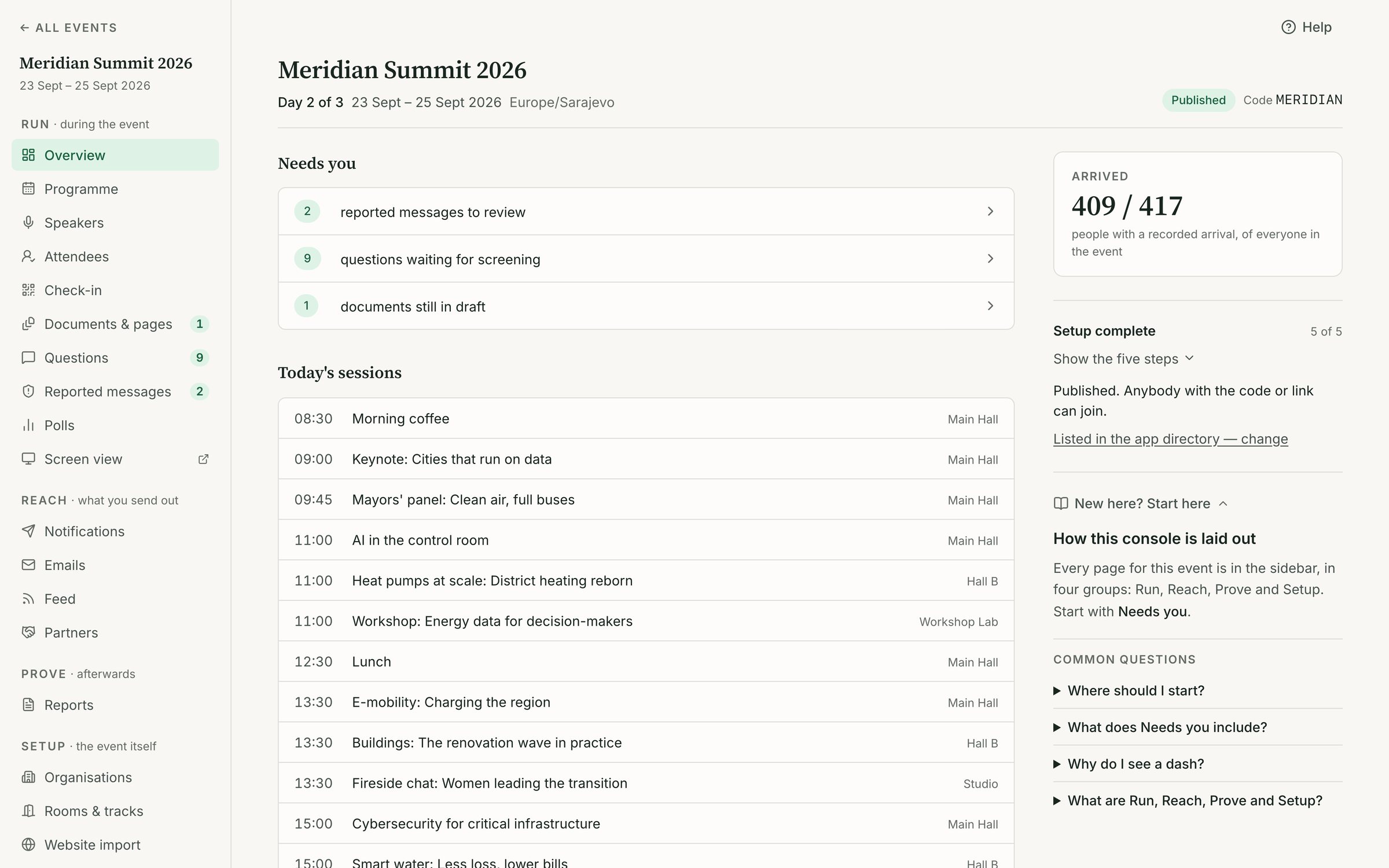
Attend console event overview showing readiness and the Setup, Run and Reach sidebar
Attend console programme editor with sessions arranged by day, room and track
02 / App

The conference in every pocket

Participants at a busy conference ask the same questions all day. Where is this session? Which hall is it in? Has it moved? Who else is here that I should meet? A printed programme answers the first question until the first change, and then it answers nothing.

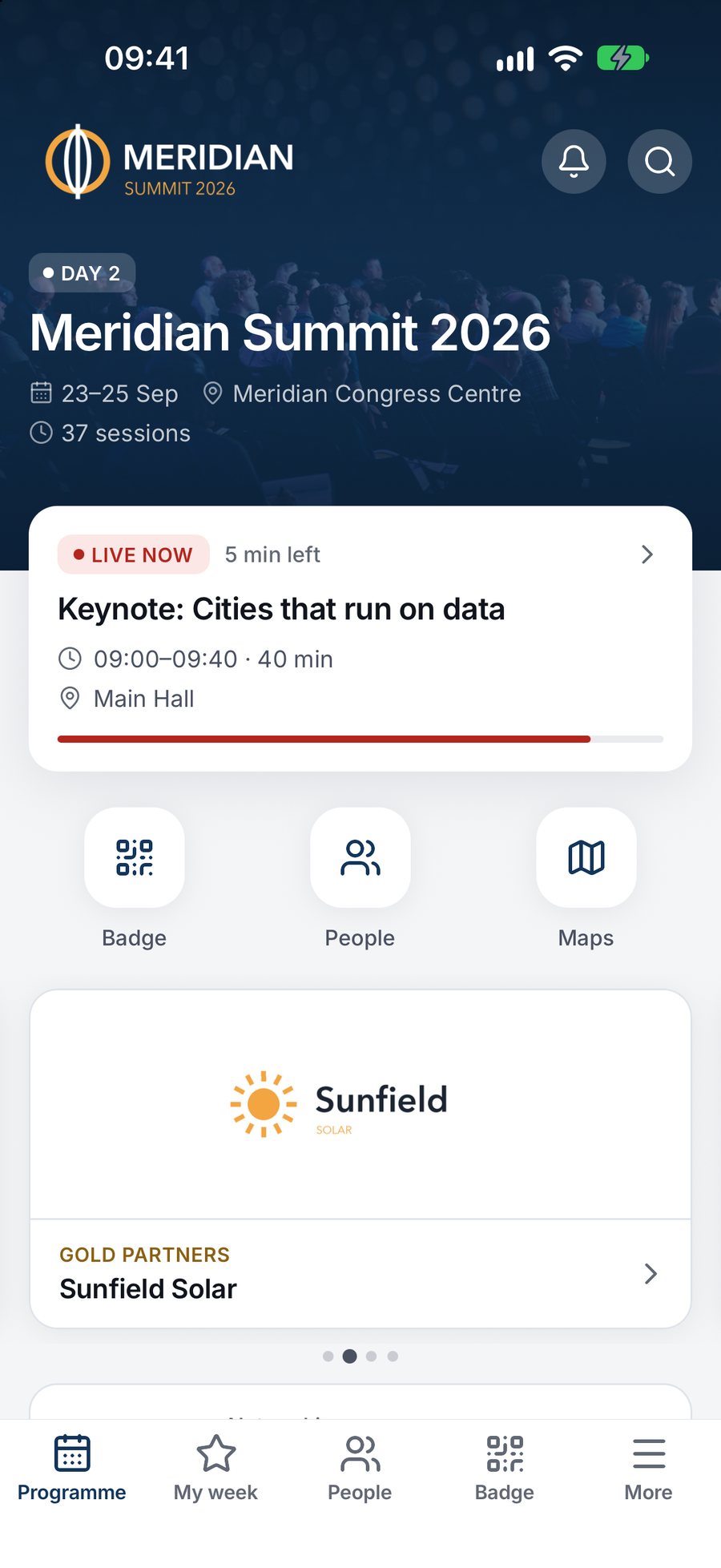
We built the Attend app in Expo and React Native, so one codebase ships to iOS, Android and the web. A participant signs in with an e-mail link, joins with an invitation or an access code, and lands on an event home in the organiser's own colour, cover photo and logo. From there the programme can be filtered by day, track, venue and organiser, with parallel sessions shown side by side so choosing between them is a glance, not a scroll.

My week, not the whole week

Saving a session adds it to My week, a personal schedule grouped by day that flags overlaps and sits alongside accepted meetings. Reminders arrive before a saved session starts. Speaker pages, partner pages, documents, venue pages and practical information are one tap away from the session that needs them.

Networking people opt into

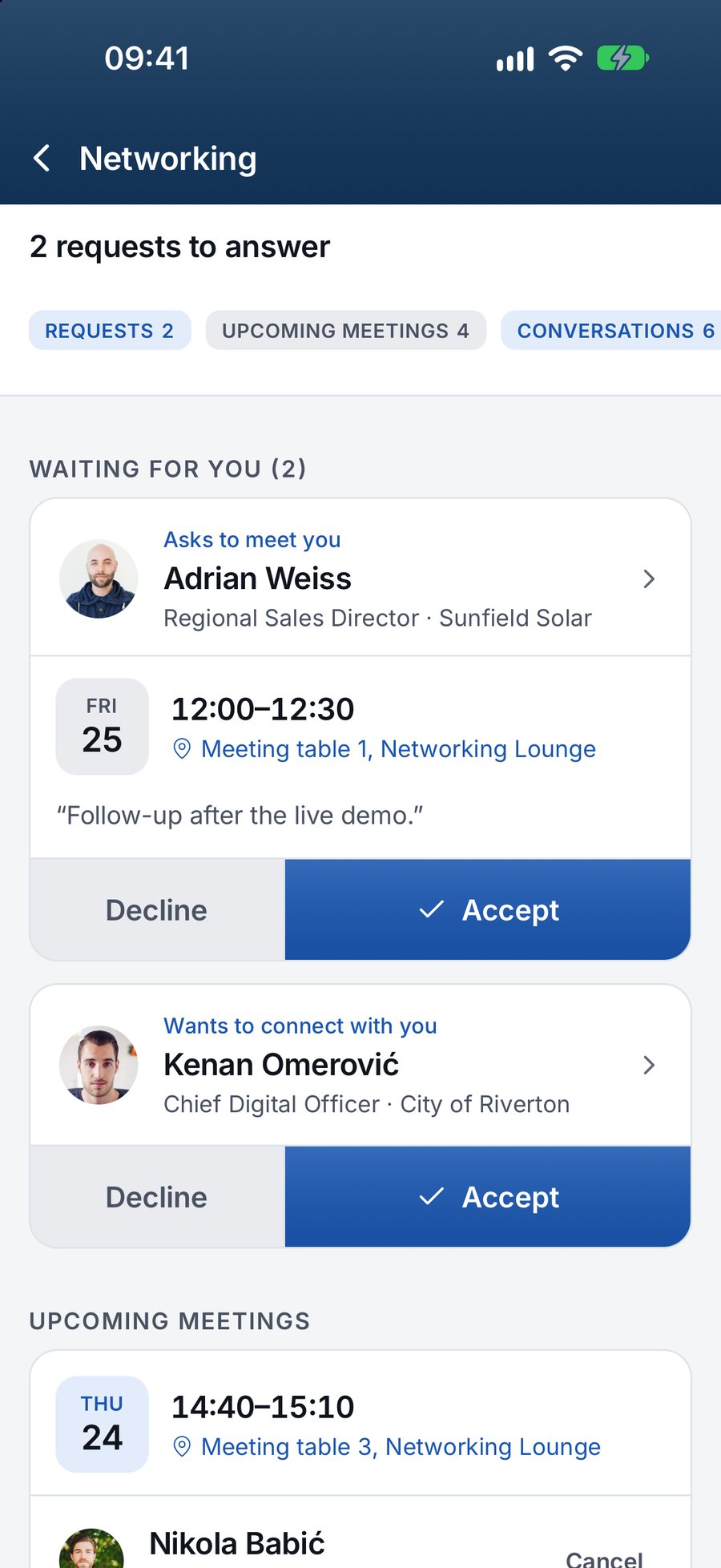
The people directory is opt-in. A participant chooses to be visible, can send and accept meeting requests, and can only message someone after a connection is accepted. Joining asks plain-language consent questions with nothing ticked in advance, and the answers can be changed later. Directory visibility, photography and marketing are recorded separately, because agreeing to one is not agreeing to all.

The decision: offline first

Conference Wi-Fi fails at the worst moment, usually when a full hall opens the app at once. So the app stores what it has already loaded: the programme, My week and the participant's badge keep working without a signal, and questions or votes are queued on the device and sent when the phone reconnects. What genuinely needs a connection, such as messages and live poll results, says so instead of failing silently.

Attend app programme with parallel sessions shown side by side and filters for day and track
Attend app people directory with opt-in profiles and meeting requests
03 / Door

A door that works without the internet

The entrance is where an event wins or loses the morning. If the scanner depends on venue Wi-Fi, one weak signal stops the line, and staff fall back to paper lists that someone has to type up afterwards. If the badge carries a name and e-mail address, every scan leaks personal data.

We designed check-in around both problems. Each participant's badge lives in the app as a QR code that holds only the event, a badge number and a digital signature. No name, no e-mail. The scanner is part of the same Attend app, opened from the menu by staff with the door role, so a team does not need special hardware to staff an entrance.

The decision: verify on the device

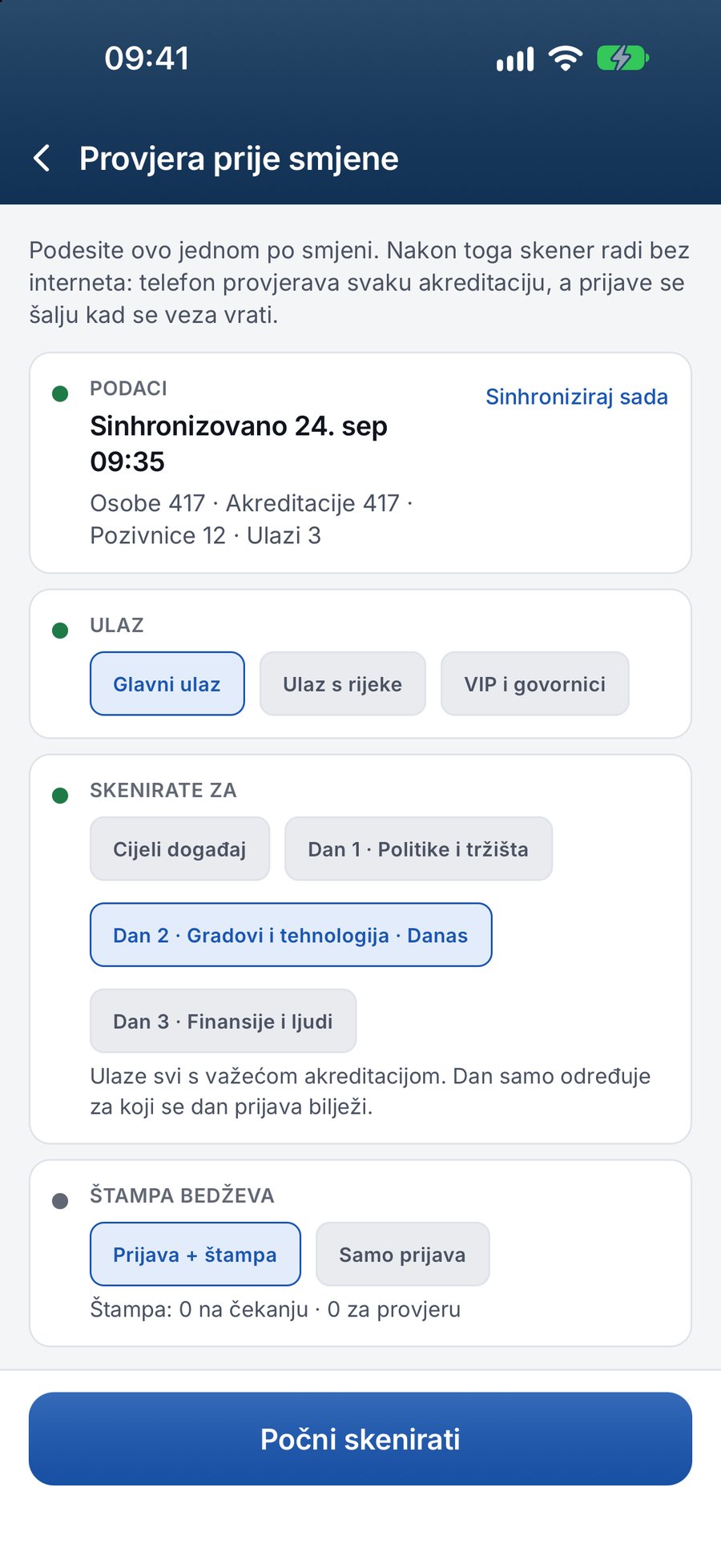
Before doors open, staff sync the scanner while they still have a connection. From then on it checks each badge's signature locally, so it can accept or refuse a badge with no network at all. Accepted scans are saved on the phone and uploaded when the connection returns, and the server checks them again and keeps one record per person for each scope. The scanner shows clearly whether it is ready, and it stops scanning if its data gets too old to trust, rather than letting stale badges through.

The desk for everyone else

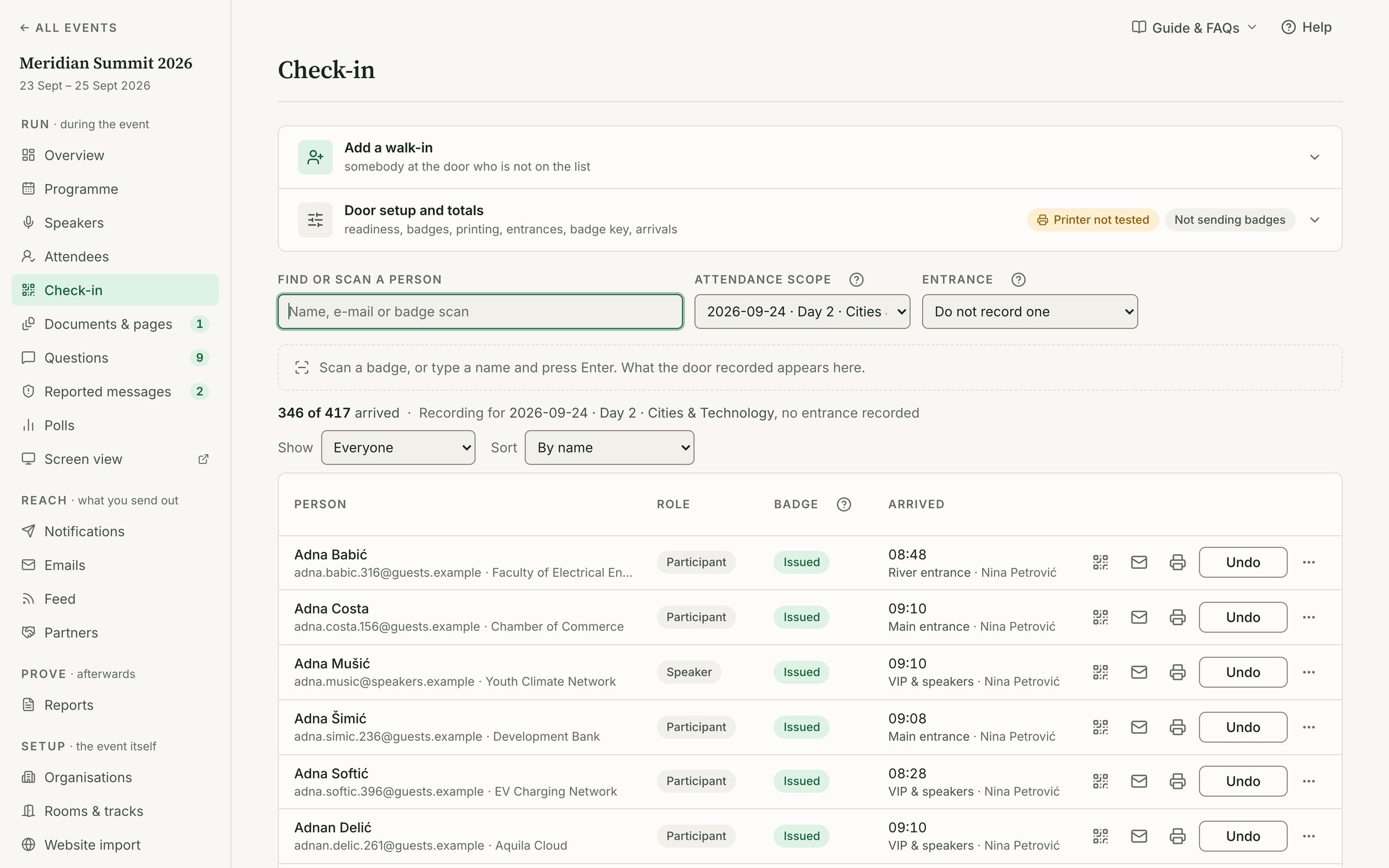
Not everyone arrives with a badge. The console desk finds a person by name and checks them in, undoes a wrong check-in, and handles walk-ins in one step: add the person, issue a badge, record the arrival and send them a sign-in link. Badges can be printed at a print station, and totals for arrived, not yet arrived and issued badges refresh on the door screen during the day.

At Sarajevo Energy & Climate Week 2026 this is where the numbers came from. Over days 1 to 3, Attend recorded 577 unique people checked in across 622 entries, and 191 people registered at the desk.

Attend door scanner in the staff app confirming a signed QR badge
Attend console check-in desk with arrival totals, entrances and name lookup
04 / Room

Questions, polls and news in the room

Inside the hall, the old tools are a roaming microphone and a moderator guessing which raised hand to pick. The loudest person asks the question, the best question goes unasked, and announcements about room changes rely on someone reading them out between panels.

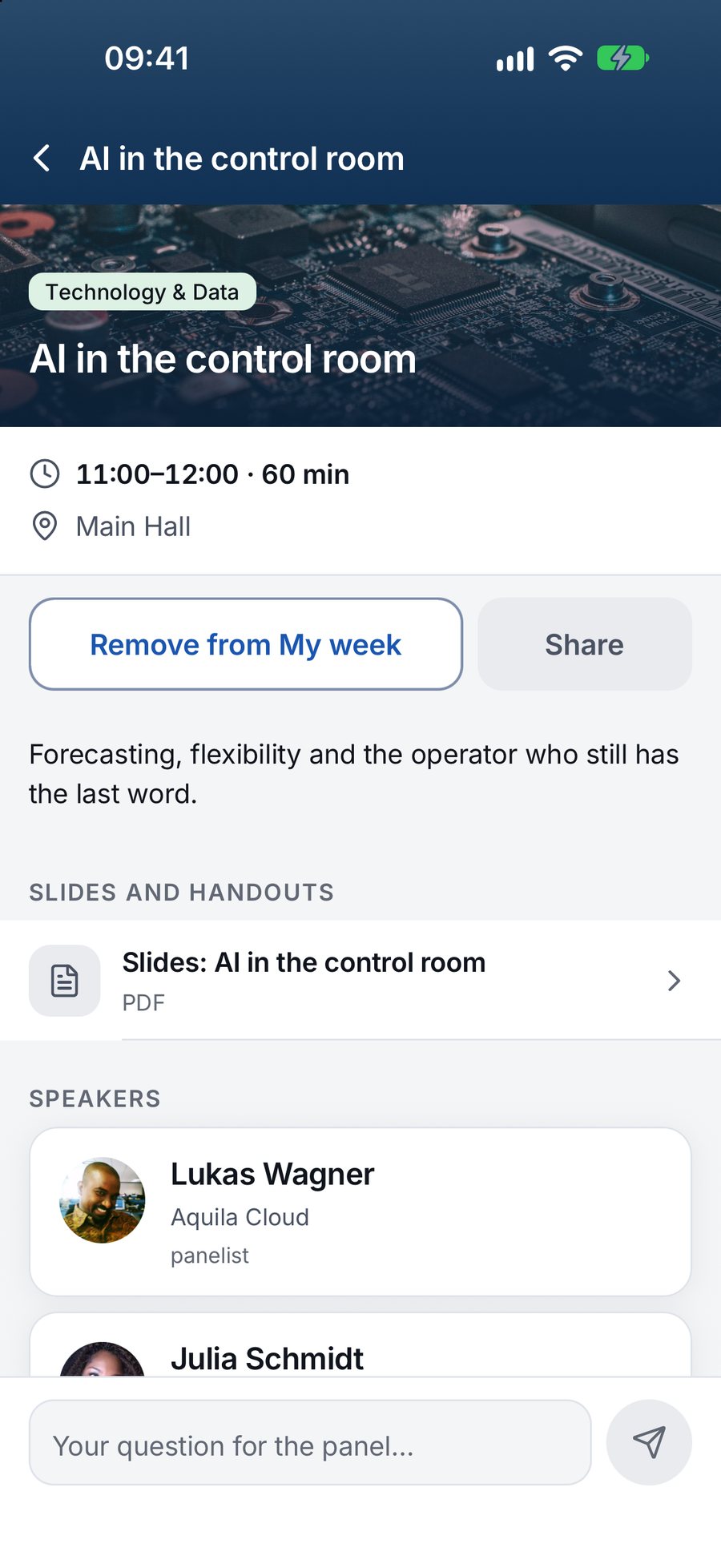
Attend moves that conversation onto the phones people are already holding. In a session, a participant can send a question, upvote the questions others have asked and vote in an open poll, then see the live result. Organisers or moderators work from a questions queue in the console: approve, reject or mark as answered, filtered by session.

The decision: a stage screen, not a dashboard

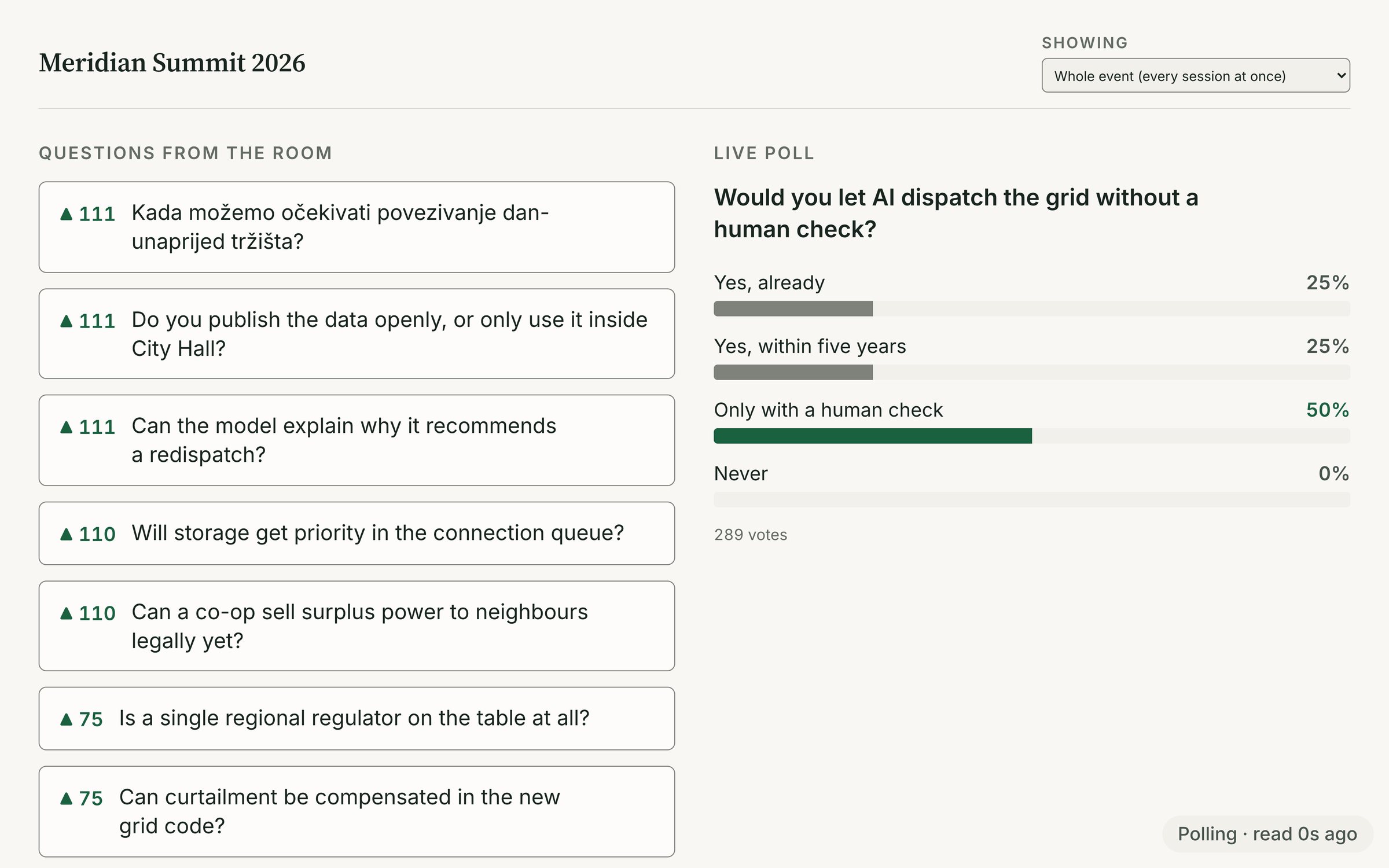
A moderator on stage cannot read a console. So we built Screen view, a projector tab that shows approved questions with the most votes first and the live poll, for the whole event or a single session. The audience sees the same ranking the moderator sees, which makes the choice of question visible and fair. A question appears there only after a person has approved it, so nothing unmoderated ever reaches the big screen.

Announcements people actually receive

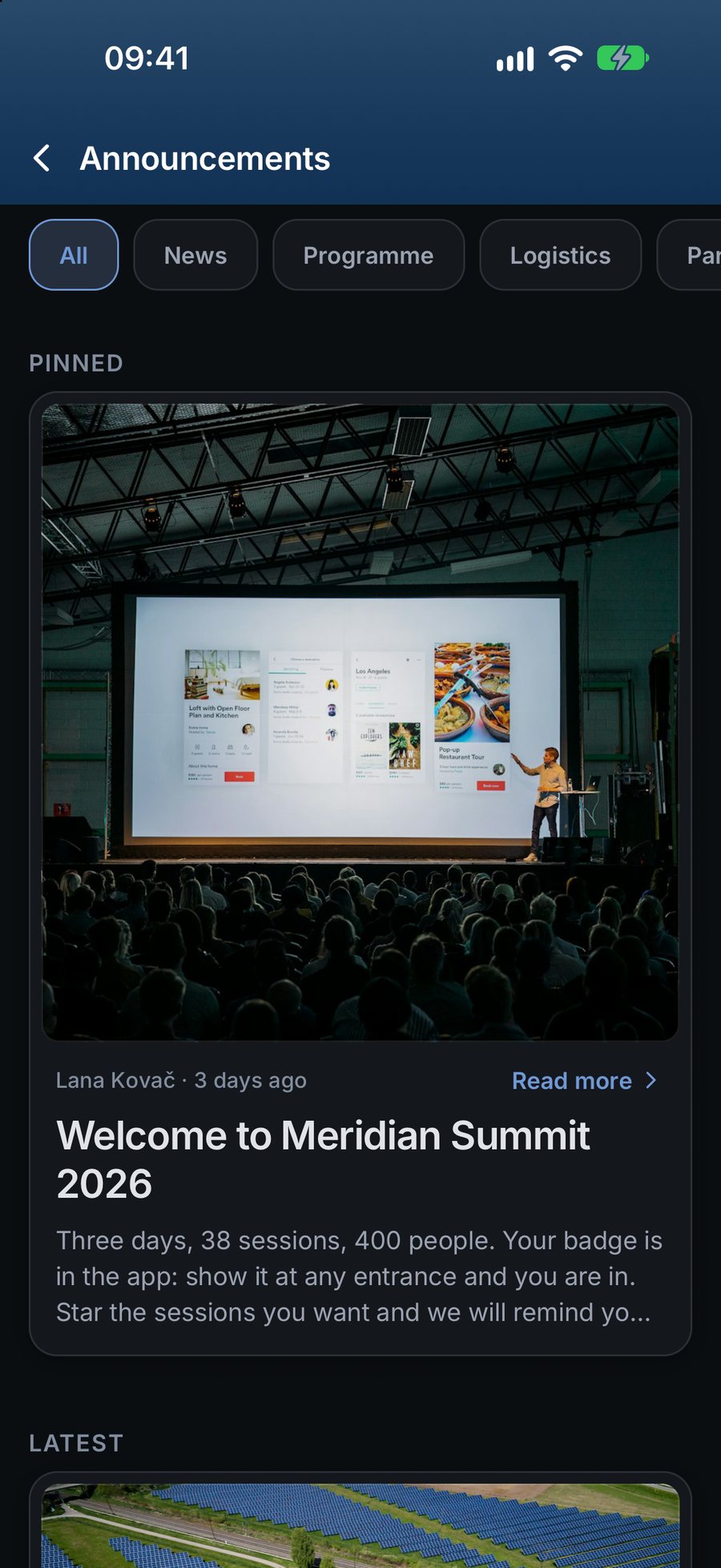
The news feed carries organiser posts in each language, with an image and a category, written ahead and scheduled or published on the spot. A separate notifications composer sends a message to everyone or to a filtered audience, by day, track, ticket type, app language or check-in status, and shows the exact number of recipients before anyone presses send. A deep link takes the reader straight to the session or page the message is about.

Editing a post after it is published does not notify everyone a second time. Small rules like this keep the channel calm, so when the organiser does send a push about a room change, people still read it.

Attend Screen view on a projector showing top-voted audience questions and a live poll
Attend app session page with audience questions, upvotes and a poll
05 / Partners

Partners and proof after the lights go off

Sponsors and co-organisers fund the event, and afterwards they ask the same question: what did we get? Too often the honest answer is a logo on a banner and a guess. Donor-funded and institutional conferences face a stricter version of it, because attendance has to survive an audit.

We gave partners a real presence inside the app and a record of it. Each partner gets a page with their logo, description in each language, website, offer, linked sessions and representatives. A partners list shows logos grouped by tier in the order the organiser sets, and scheduled placements run for set periods. The app records displays, profile views and taps as they happen.

Results a partner can take away

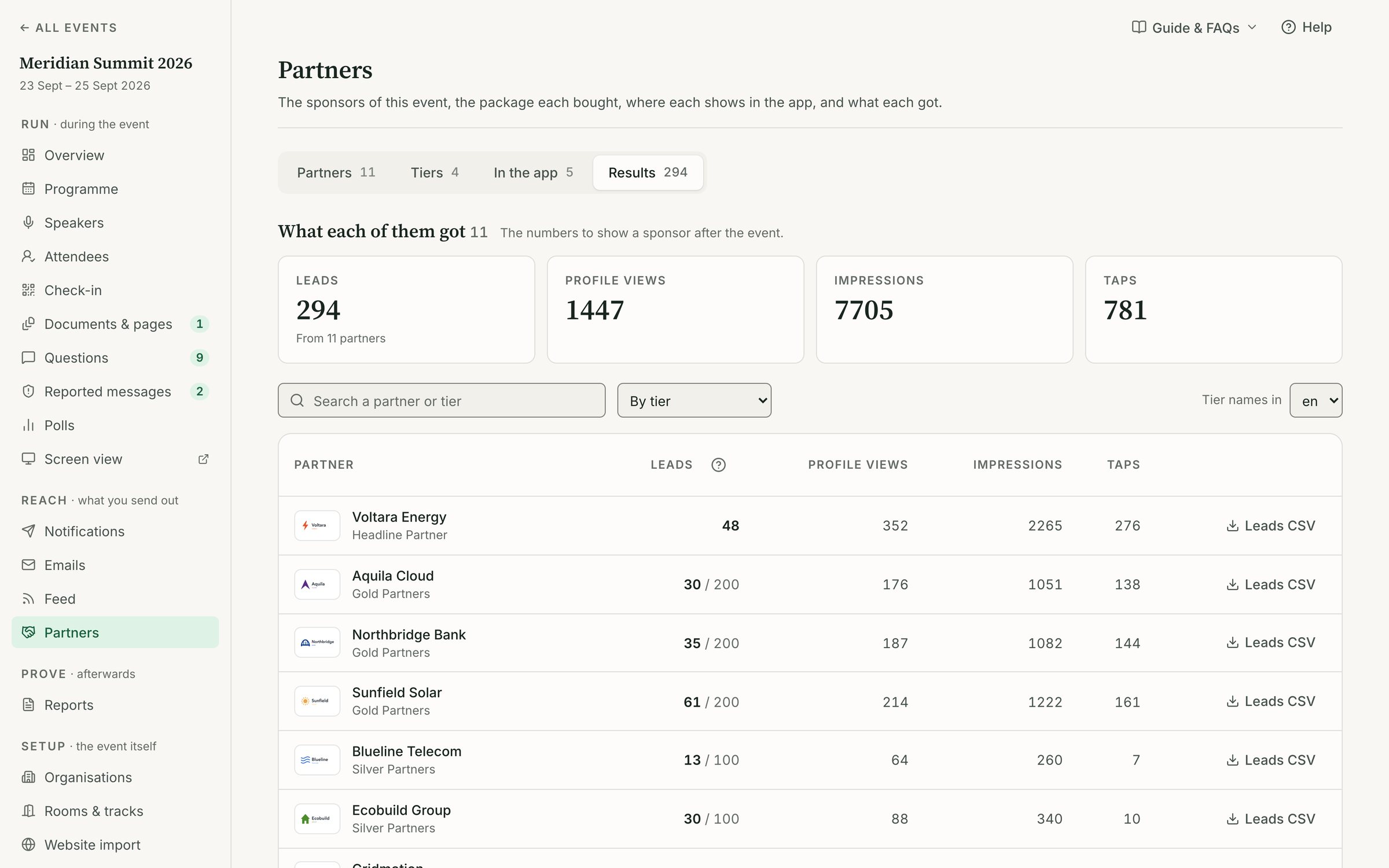
In the console, Partners → Results turns those records into rows a partner can understand: displays, profile views, taps, captured contacts and attendance at linked sessions, exported as a PDF for each partner and as CSV for the team. Partner representatives can capture leads by scanning an attendee's badge, but only if the attendee has given permission, and a withdrawal removes them from later exports.

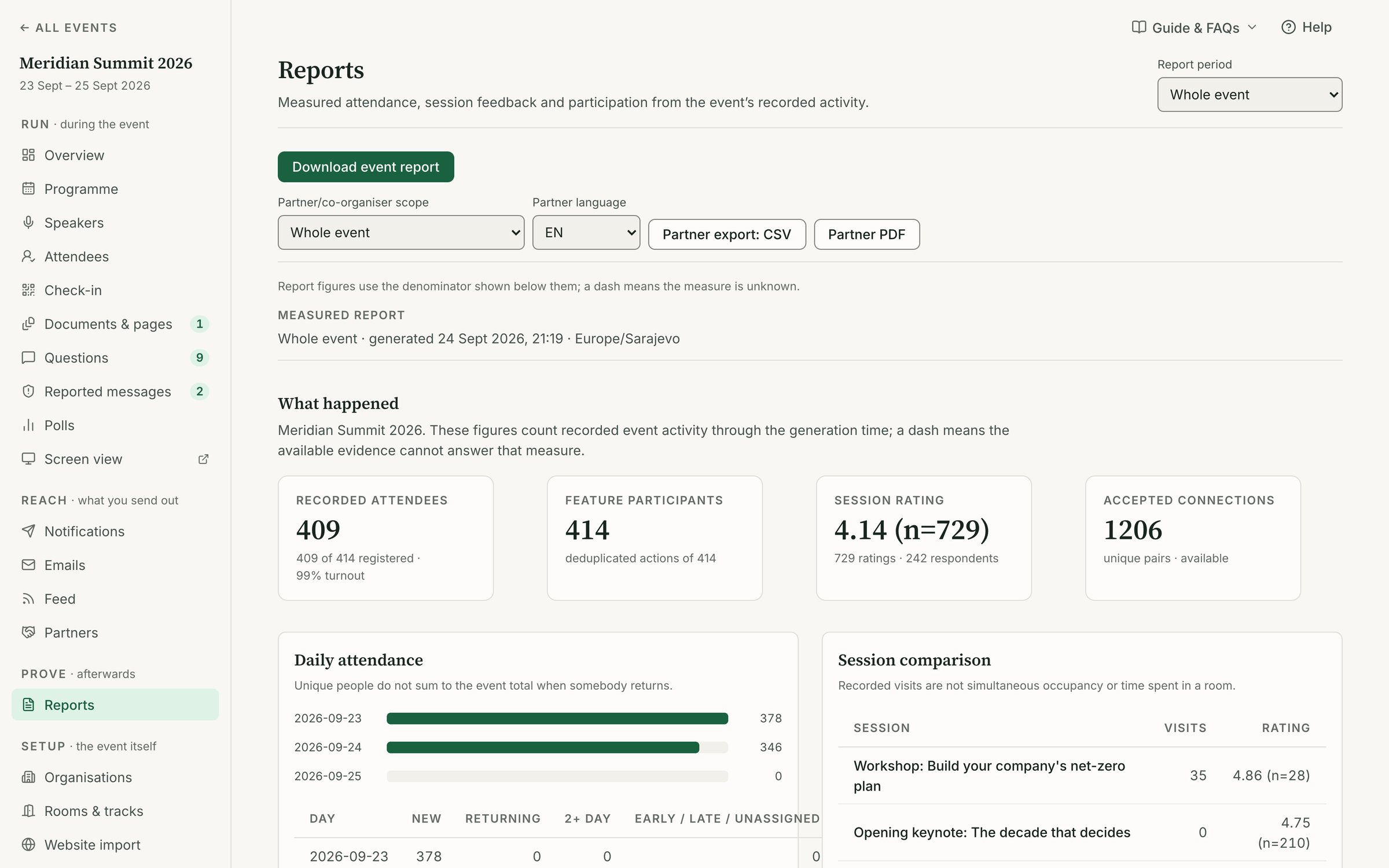
Attendance reports work the same way for organisers and co-organisers: by event or by day, per entrance and per organiser, in either language, as CSV or PDF.

The decision: never round up

Every report separates unique people from entries and registrations, because they are different things. A dash in a report means nothing was recorded, and it is never shown as a zero. Attend does not claim a partner's return on investment, and the reports do not pretend to.

At SECW 2026 that discipline produced numbers partners could trust. Over days 1 to 3, 230 phones used the app and partner logos were displayed 1,679 times, each figure published with the date and scope it was read at.

Attend console partner results with displays, profile views, taps and captured contacts per partner
Attend console attendance report by day, entrance and organiser with CSV and PDF export
06 / Build

Two months, one deadline, a whole company

Attend is our own product, and it had a fixed date to meet. Sarajevo Energy & Climate Week opened on 21 September 2026 across two venues and two languages, and the platform had to be in organisers' hands, in the App Store and on the door before then. The first commit went in on 24 August. The iOS app went public on 16 September, five days before the doors opened.

We treated it as a product, not a project: Fedja, Alen, Adnan and Azra designed and built every layer, from the database to the logo.

The stack

  • Console: a React app for organisers, with a strict security policy and self-hosted error tracking
  • Backend: self-hosted Supabase for the database, storage and sign-in, running in the EU, with access rules enforced by database policies
  • App: Expo and React Native for iOS, Android and web, with over-the-air updates for fixes between store releases
  • Site: an Astro marketing site behind Cloudflare, with a Payload CMS for leads and content

Programme import uses Claude to read an event's public website and draft the programme, so a team starts from its existing schedule instead of typing it in again. No attendee data is sent to it.

The brand

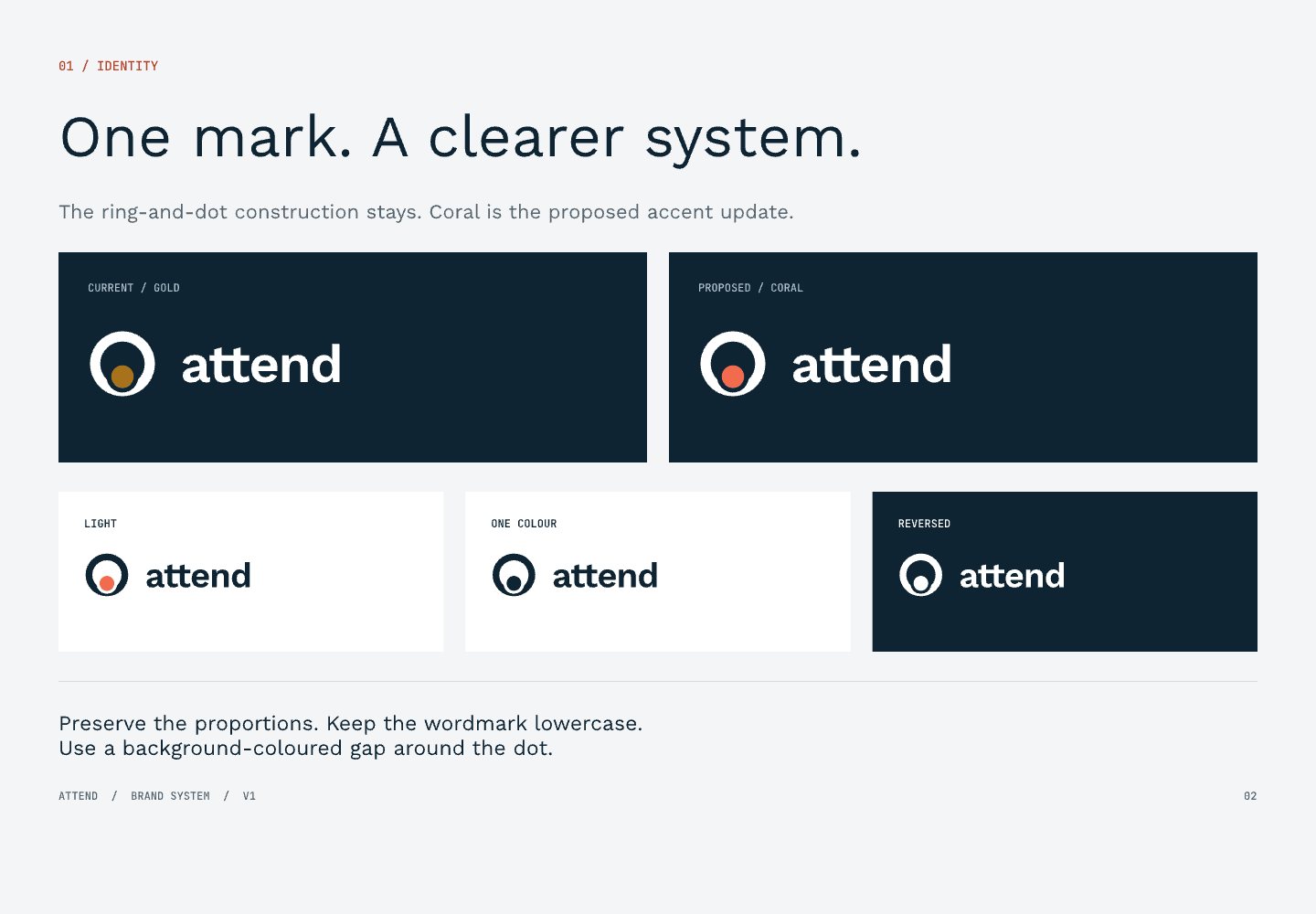
The mark is a thick ring with a small dot orbiting its base: a venue and the person arriving at it. The palette is deep navy and paper with one coral accent, set in Work Sans with JetBrains Mono for data and labels. It is calm on purpose. Attend sells to institutions, chambers and donor-funded organisers who need to trust the numbers more than they need to be dazzled.

The decision: say only what is true

The marketing site runs in full English and Bosnian parity, with feature pages, use cases, guides, comparisons, a glossary and a public organiser manual. We wrote it the way we built the reports. Every figure carries its scope and the date it was read, every screenshot is labelled as demo data, and each product page says what Attend does not do. That restraint is the brand.

Attend brand system with the ring-and-dot mark, lowercase wordmark, navy, paper and coral palette
Attend app news feed in dark theme with organiser announcements
03 / 03The Results
Attend console programme builder organised by day, room and track
Attend app programme with filters and parallel sessions side by sideAttend app session page with audience questions and a live poll
Attend app digital badge with a signed QR code that opens offlineAttend staff scanner checking a badge at the door
Attend app people directory with opt-in profiles and meeting requestsAttend app news feed in dark theme
01 / 04

Attend proved to be a practical, easy-to-use and reliable solution for SECW. Participants quickly felt comfortable using the app and finding sessions of interest, while the ability to connect and communicate with one another enhanced the overall experience. Despite a tight preparation timeline, everything was ready on time, and the app ran smoothly throughout the event.

Zina Jusic
SECW
Attend console check-in desk with arrival totals and name lookup
Outcome

A complete conference platform, live at a two-venue, bilingual event two months after the first commit.

Attend console attendance report with per-day and per-entrance figures
Result 01

577 People Checked In

Over the first three days of SECW 2026, Attend recorded 577 unique people at the door across 622 entries, at an event spread over 2 venues.

Result 02

191 Desk Registrations

Walk-ins were added, badged and checked in at the desk in one step, with 191 on-site registrations recorded in days 1 to 3.

Result 03

230 Phones on the App

230 phones used the Attend app during the first three days for the programme, questions, polls, networking and badges.

Result 04

1,679 Logo Displays

Partner logos were displayed 1,679 times in the app in days 1 to 3, counted and reported rather than estimated.

Result 05

2 Languages, Full Parity

The console, app and marketing site run in Bosnian and English, and SECW ran in both, with publishing blocked until every required translation was in place.

Result 06

Live in 2 Months

From the first commit on 24 August to the iOS app going public on 16 September and SECW opening on 21 September 2026: console, app, backend, site and brand in two months.

An event app needs more than a good interface — it has to perform reliably in real-world conditions. Throughout SECW, Attend delivered stable performance, straightforward functionality and easy access to essential information. I particularly appreciated that the tight preparation schedule did not come at the expense of reliability. Everything was ready on time, allowing us to focus on the event rather than technical issues.

Mirza Pozder
SECW

Next Project

Ogledalce

E-commerce Platform & Mobile App View case study
Ogledalce — project preview

Running a conference that has outgrown spreadsheets?

We built Attend for the events we know best. If you need a platform, an app or a whole product designed and shipped against a real deadline, let's talk.

Thank you. Your message has been received.
Your message could not be sent. Please try again.